
SalesEdge · Sales operations · 25 October 2026
How to calculate meeting show rate
Divide meetings attended by meetings due in the same reporting period, then multiply by 100. New bookings are a different measure: some may be scheduled for next week.
The formula
Show rate = attended meetings ÷ meetings due × 100
Use the same set of meetings for both counts. If no meetings were due, report “not applicable”, rather than 0%.
Try the free calculatorNo email, account or upload. Calculations stay in your browser.
Example: nine bookings, five meetings attended
Imagine a team booked nine new meetings this week. Five meetings actually took place. Dividing five by nine gives 55.6%, but that does not necessarily describe this week’s attendance.
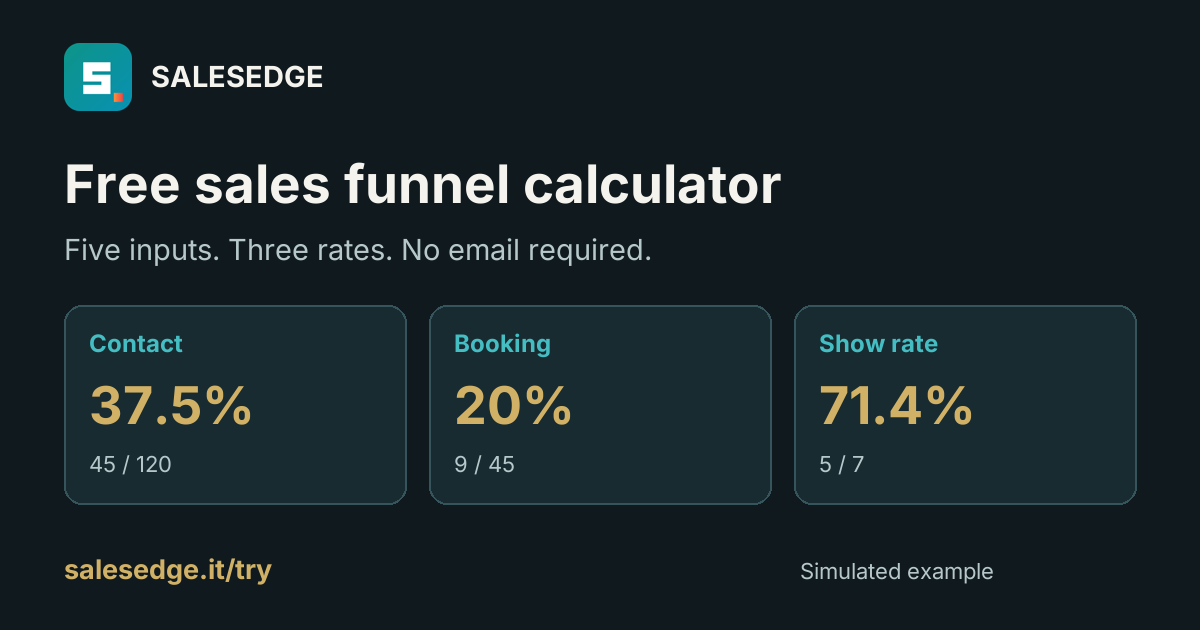
Check the calendar. In this simulated example, seven meetings were due this week, including meetings booked earlier. Five of those seven were attended. The show rate is therefore 5 ÷ 7 × 100 = 71.4%. The nine new bookings belong in the booking report.
Keep three questions separate
- Did we reach people?
- Contact rate: conversations divided by contact attempts. Example: 45 ÷ 120 = 37.5%.
- Did those conversations create bookings?
- Booking rate: new meetings booked from those conversations, divided by conversations. Example: 9 ÷ 45 = 20%.
- Did scheduled meetings take place?
- Show rate: attended meetings divided by meetings due. Example: 5 ÷ 7 ≈ 71.4%.
All figures here are simulated. These are working definitions for this calculator, not claimed industry standards. If your team uses a different definition, label it explicitly and use it consistently.
Make the weekly count repeatable
- Choose the period and time zone. For example, Monday through Sunday in the team’s reporting time zone. Do not mix an export based on UTC with a calendar grouped by local dates without checking the boundary.
- Identify the meetings due. Keep a meeting ID or another stable reference. Two attendees joining one appointment do not create two meetings.
- Match attendance to that set. Every attended meeting in the numerator must belong to the denominator. If attended exceeds due, fix the input or definition before interpreting the rate.
- Document cancellations and reschedules. Decide whether cancelled appointments remain in your due count and when a rescheduled meeting moves to a later period. Record the statuses separately. Do not silently change the rule to improve the number.
- Keep counts alongside percentages. Five of seven and fifty of seventy produce the same percentage, but they are different sample sizes. Include both numbers in the report.
Combine teams by adding counts
Do not average percentages when the denominators differ. In another simulated example, one setter holds 4 of 5 meetings and another holds 1 of 5. The team rate is (4 + 1) ÷ (5 + 5) = 50%.
If the second setter instead holds 1 of 2, the team rate is 5 ÷ 7 ≈ 71.4%. Averaging 80% and 50% would incorrectly give 65%. Add attended meetings and due meetings first, then calculate the percentage.
What should you do with a low show rate?
The rate identifies a result, not its cause. Review the underlying records: cancellations, reschedules, missing calendar invitations, meeting lead time and what the prospect agreed to. Those are possible checks, not an automated diagnosis.
A meeting taking place also does not prove that it was qualified, useful or profitable. Track later outcomes separately. This page does not assume a universal “good” show-rate benchmark or promise increased sales.
Start with the free check
Enter five counts in the free SalesEdge calculator to calculate contact, booking and attendance rates. You can change the sample values; no contact details are required.
If you want a spreadsheet starting point for the team, the optional Setter Operations Kit costs €4.90 once, charged in EUR. It includes four Excel workbooks: English and Italian, each with a blank and a simulated demo version. Manual entry, no CRM connection. Review the product page for exact contents and requirements.